AmEle: simple condo manager
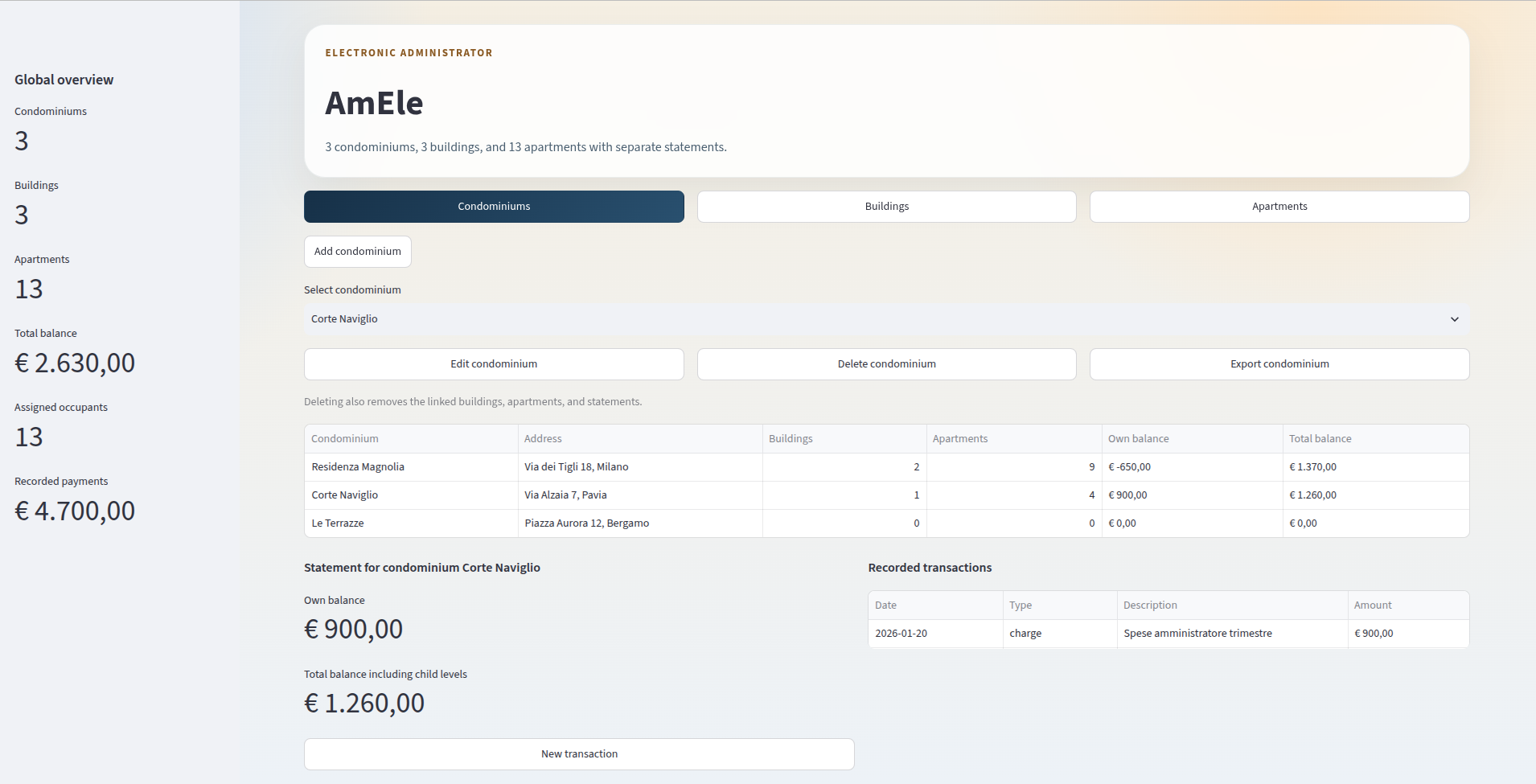
AmEle is a small Streamlit application for managing a condominium archive with a hierarchical structure:
- an archive contains multiple condominiums
- each condominium contains multiple buildings
- each building contains multiple apartments
- each level has its own financial statement
The app lets you work on the data through a graphical interface, saving it to the data.json file.
Project structure
app.py— Streamlit graphical interfacemodels.py— data model, JSON loading and saving logicdata.json— persistent data archiverequirements.txt— Python dependencies to install withpip.streamlit/config.toml— Streamlit UI configuration (light theme, minimal toolbar)
Data model
The hierarchy is as follows:
CondominiumArchive— the root container; holds every condominium and exposes archive-wide totals.- holds the list of condominiums
Condominium— a condominium complex, grouping one or more buildings under one address.- main condominium data
- list of buildings
- own statement
Building— a single building block within a condominium, grouping its apartments.- main building data
- list of apartments
- own statement
Apartment— one real estate unit; itssharesfield is the ownership quota (the Italian millesimi) used to apportion condominium expenses.- real estate unit data
- owner
- occupant
- own statement
Person— a condominium member, referenced as either an apartment's owner or occupant.- first name
- last name
- phone
- tax code
Transaction— one accounting entry: achargeadds to the balance, apaymentreduces it.- description
- amount
- type (
chargeorpayment) - transaction date
Class diagram
classDiagram
    class CondominiumArchive {
        +condominiums: list[Condominium]
        +total_balance()
        +total_buildings()
        +total_apartments()
    }

    class Condominium {
        +name: str
        +address: str
        +notes: str
        +transactions: list[Transaction]
        +buildings: list[Building]
        +balance()
        +total_balance()
    }

    class Building {
        +name: str
        +notes: str
        +transactions: list[Transaction]
        +apartments: list[Apartment]
        +balance()
        +total_balance()
    }

    class Apartment {
        +code: str
        +unit: str
        +floor: str
        +area_sqm: float
        +shares: float
        +notes: str
        +transactions: list[Transaction]
        +balance()
    }

    class Person {
        +first_name: str
        +last_name: str
        +phone: str
        +email: str
        +tax_code: str
        +full_name
    }

    class Transaction {
        +description: str
        +amount: float
        +type: str
        +transaction_date: str
    }

    CondominiumArchive "1" --> "*" Condominium
    Condominium "1" --> "*" Building
    Building "1" --> "*" Apartment
    Condominium "1" --> "*" Transaction
    Building "1" --> "*" Transaction
    Apartment "1" --> "*" Transaction
    Apartment "1" --> "1" Person : owner
    Apartment "1" --> "1" Person : occupant
Balances
Balances are kept separate per level:
Own balance: only counts the transactions of the current componentTotal balance: adds the own balance to the balances of the child levels
So:
- an apartment only has an
Own balance - a building has an
Own balanceand aTotal balancecombined with its apartments - a condominium has an
Own balanceand aTotal balancecombined with its buildings and their apartments
Main features
The app is organized into three sections: Condominiums, Buildings, Apartments. In each section you can:
- select the current context through dropdowns
- add a new item with a modal dialog
- edit an existing item with a modal dialog
- delete an item with a confirmation modal
- see a summary table consistent with the selected level
- manage the statement of the selected component
- export the full state of the selected component through a single dialog
Main flow
flowchart TD
    A[Start Streamlit app] --> B[Load data.json]
    B --> C[Choose section: Condominiums, Buildings, Apartments]
    C --> D[Select current component]
    D --> E[User action]
    E --> F[Add, edit, or delete]
    E --> G[Manage statement]
    E --> H[Open export dialog]
    F --> I[Save to data.json]
    G --> I
    H --> L[Choose format: PDF, Word, or Excel]
    L --> N[Download the file]
    I --> M[Reload interface with updated state]
Statements
Each section also contains the statement of the selected component. From here you can:
- see the balances
- see the recorded transactions
- add a new transaction with a modal dialog
Owner and occupant
Both an owner and an occupant are managed for every apartment; rule used in the app:
- if you leave the occupant fields empty when adding or editing, the occupant is automatically set equal to the owner
- if the occupant is different from the owner, you can fill it in manually
Document export
From every section you can export the selected component by opening a dedicated dialog: Export condominium, Export building and Export apartment. Then, each of the options as three available formats: PDF, Word (.docx), Excel (.xlsx).
Exported documents contain:
- main data of the component
- any linked items
- recorded transactions
- balances
- condominium location and generation date in document format
Export flow diagram
flowchart TD
    A[Click Export condominium/building/apartment] --> B[Open Export dialog]
    B --> C[Download PDF]
    B --> D[Download Word]
    B --> E[Download Excel]
    C --> F[Close dialog and download]
    D --> F
    E --> F
Data file compatibility
Data is saved to data.json. The loader in models.py also handles data normalization:
- if it finds old owners saved as a plain string, it converts them to the new person format
- if the occupant is missing, it sets it equal to the owner
- if it finds the old flat format without a condominium archive, it automatically converts it to the new hierarchical format
Requirements
- Python 3.10 or later
pip
Python dependencies:
streamlitreportlabopenpyxlpython-docx
You can install them with:
pip install -r requirements.txt
Running the app
Create and activate a virtual environment, install the dependencies, then start the app:
python3 -m venv .venv
source .venv/bin/activate  # on Windows: .venv\Scripts\activate
pip install -r requirements.txt
streamlit run app.py
If you already have a virtual environment, just activate it first, or call the correct binary directly.
Generated and ignored files
The repository includes a .gitignore that ignores:
__pycache__/.venv/tags.codex
Practical notes
- the
data.jsonfile is updated whenever you save operations from the interface - the dataset can be populated with sample data to test the app more easily
- if you want to start from scratch, you can empty or replace the contents of
data.json