Vim-StartScreen
A minimal, dependency-free start screen for Vim / NeoVim. When you open Vim with no file arguments and an empty buffer, vim-startscreen fills the window with a centered ASCII-art header instead of the usual blank screen.
It is a rip-off of the very clever startscreen by haomingw, trimmed down to just the header/logo behavior.
Features
- Shows a centered ASCII-art banner on Vim's empty start buffer.
- Zero dependencies, zero configuration required to get started.
- Fully customizable header via a single global variable.
- Dedicated
startscreenfiletype with its own syntax highlighting (startscreenHeader/startscreenFooter), so the banner can be themed independently from the rest of your colorscheme. - Safe by design: it never triggers when Vim is started with a file argument, piped input,
-y/-Mmode, or an unmodifiable buffer, and it won't clobber unsaved changes in the current buffer. - The scratch buffer it creates is
nofile/unlisted/unmodifiable, so it never gets saved or shown in buffer lists.
Preview
By default, the screen shows an ASCII-art mascot, followed by a figlet-style wordmark:
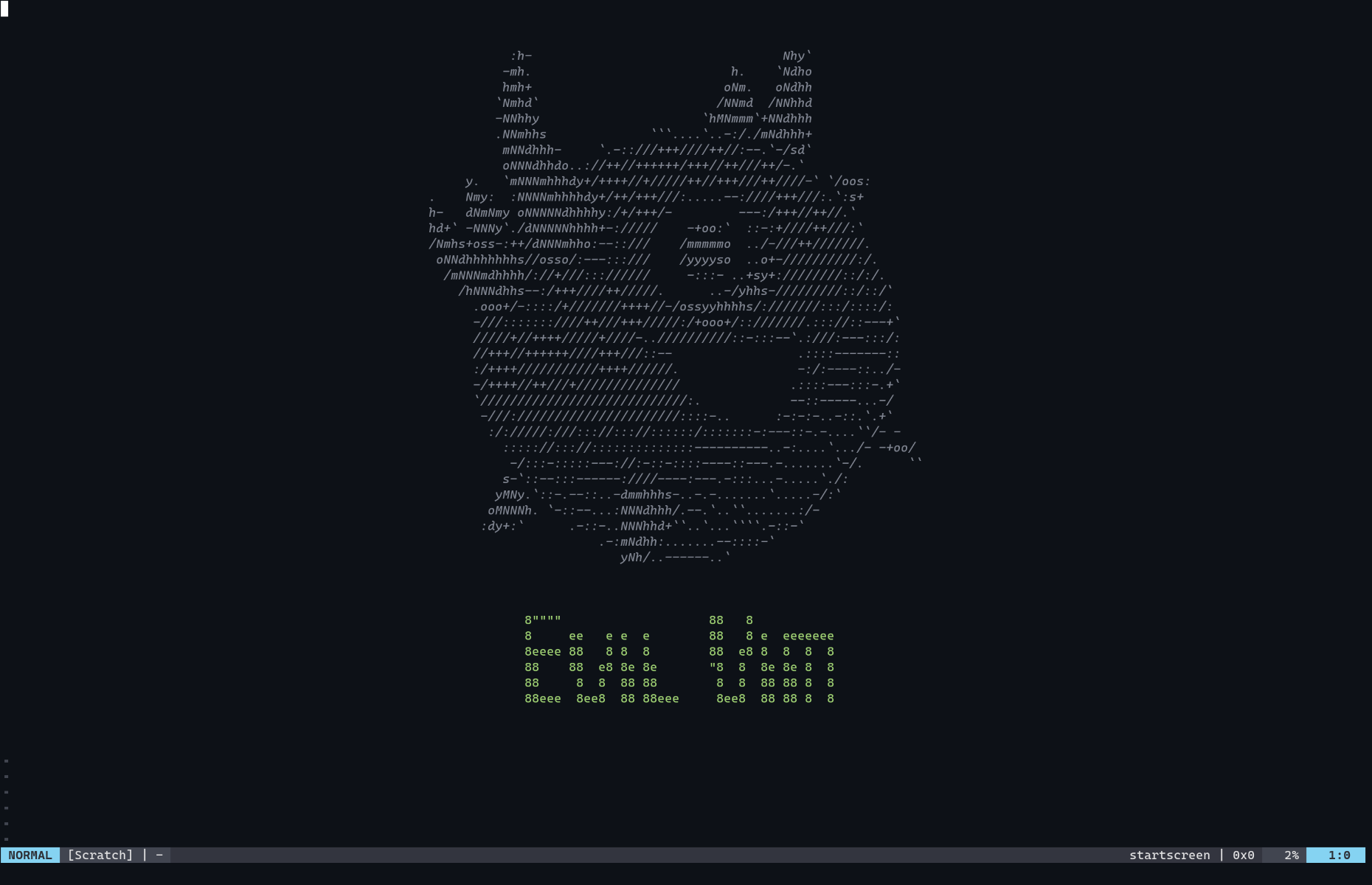
Both the mascot and the wordmark are just plain text baked into autoload/startscreen.vim, centered at runtime — no images, no external assets. They aren't rendered in a single flat color either: the startscreen filetype's syntax file highlights the mascot and the wordmark as two separate regions (startscreenHeader and startscreenFooter, see Highlighting), so they show up in different colors straight out of the box.
Installation
Use your favorite plugin manager.
Plug 'matteogiorgi/vim-startscreen'
Plugin 'matteogiorgi/vim-startscreen'
use 'matteogiorgi/vim-startscreen'
Native package (Vim 8+ / Neovim), no plugin manager
git clone https://github.com/matteogiorgi/vim-startscreen.git ~/.vim/pack/plugins/start/vim-startscreen
No further setup is needed: the plugin registers a VimEnter autocommand and shows the screen automatically the next time you open Vim with no arguments.
Usage
Just open Vim with no arguments:
vim
The start screen is shown automatically. You can also trigger it manually at any time on an empty, unmodified, unmodifiable-safe buffer with:
:Startscreen
The start screen will not appear when:
- Vim is opened with a file argument (
vim file.txt) or with data on stdin. - Vim is started with
-y(easy mode) or-M(no modifications allowed). - The current buffer has unsaved changes and
'hidden'is off — in that case a warning is shown instead so you don't lose work.
Configuration
Custom header
Override the default banner with g:startscreen_custom_header. It accepts either a Vim List of strings (one per line) or a String that evaluates to such a list:
" As a list of strings
let g:startscreen_custom_header = [
    \ 'Welcome back.',
    \ '',
    \ 'May your builds be green.',
    \ ]

" Or lazily, as an expression string
let g:startscreen_custom_header = 'my#header#lines()'
Each line is automatically centered according to the current 'columns' width. Set the variable to an empty list (or an expression returning one) to disable the header entirely.
Highlighting
The plugin exposes two highlight groups on the startscreen filetype, linked to sensible defaults out of the box:
| Group | Linked to | Covers |
|---|---|---|
startscreenHeader |
Comment |
The main body of the header art |
startscreenFooter |
Function |
The last few lines of the header (e.g. the wordmark) |
Override them in your colorscheme or vimrc as you would any other highlight group:
highlight startscreenHeader guifg=#5c6370
highlight startscreenFooter guifg=#61afef gui=bold
How it works
On VimEnter, if the current buffer is empty, unnamed, and safe to modify, the plugin:
- Turns the current buffer into a throwaway scratch buffer (
buftype=nofile,bufhidden=wipe, no swapfile, unlisted, no number/sign/fold columns…). - Computes the header lines (custom or default) and centers each one based on the terminal width.
- Appends the centered lines to the buffer, then marks it
nomodifiableand setsfiletype=startscreenso the syntax file can highlight it.
All of this lives in a single autoload function (startscreen#start()), so the plugin has no runtime cost until Vim actually needs to draw the start screen.
Requirements
- Vim 7.4+ or Neovim, with no external dependencies.